On February 12, 2026, the Nintendo Switch 2 game Mario Tennis Fever was
released and I thought it’d be fun to play this with remote friends who don’t
own the game. Nintendo proudly advertises that this is possible via GameShare,
but fails to mention that there are two variants of GameShare: Online and Local.
Some games - like Mario Tennis Fever - only support local GameShare. This is
actually mentioned in the About this item section of the official product
page for the
USA,
but absent from product pages for other regions.
So I did what any reasonable person would do: Spend the next two months building a game streaming solution which costs more than a second copy of the game and allows players to use a Nintendo Switch 2 remotely 😅.
Requirements
First off, this only makes sense for Nintendo Switch 2, because it’s the only game console, which can neither be emulated nor does it support remote play like the PS5 and Xbox.
So what is needed?
- A way to capture audio and video from the HDMI port.
- A USB device port which presents itself as a Switch Pro controller, which can be fed with inputs.
Both have to be integrated into the open-source game streaming server Sunshine somehow. At first I thought I could simply open an app like OBS Studio, which can play audio and video from the capture card. Then, I could run a background program which reads gamepad inputs from the OS and forwards them via USB. With that setup, I could just start Sunshine and let it stream my desktop normally.
While that would work, the gaming experience would be pretty bad due to high latency.
Latency
There are multiple kinds of latency, that are important. The same names might be defined slightly differently in other contexts, so I’ll provide my own definitions for the context of this article.
Display latency is the time between when a local, HDMI-attached display renders a frame and when it is rendered on a remote machine by the game streaming client Moonlight.
Local input latency is the time between a local user sending a button press via a Pro controller attached via USB, and them seeing the game react to that on their local display.
Remote Input latency is the time between a remote user sending a button press via Moonlight, and them seeing the game react to that on their remote display. Thus, remote input latency is a superset which contains both display latency and local input latency.
These are the most important latencies, but there are also more specific ones, which are part of the latencies above:
Host processing latency is the time between the Sunshine server receiving a frame and sending it out to the network.
Network latency is the time between Sunshine sending a frame to the network and Moonlight receiving it. To remove this factor from my tests as much as possible, I only tested with Moonlight and Sunshine running on the same network, where the latency is less than 1ms.
The remote input latency must be as far below 100ms as possible, because that’s where most people will notice issues. Ideally it would be closer to 50ms.
The options
In the end I didn’t really have much of a choice, because the requirements narrowed it down to very few devices. The following sections describe why that is the case.
Network interface
Whatever device Sunshine runs on, it needs a 1GBit/s network interface to be able to stream without issues. Ideally natively rather than USB adapters. Almost every system supports this nowadays so that’s not much of an issue.
USB Device Controller (UDC)
Even with USB-C being common these days, x86/x64 systems still don’t have UDC
ports. There is a linux kernel driver for PCIe cards based on NetChip NET228x / PLX USB3x8x but it seems like it’s impossible to buy them these days.
This limits our choice for the system running Sunshine to one of the many ARM SoCs. This comes with a new complication though:
Hardware video encoding
To keep the host processing latency down, the system needs to support hardware video encoding. On most Linux systems, Sunshine uses VA-API for that (via ffmpegs libavcodec). I set myself the goal of supporting 1080p at 60fps, since that provides a good experience for most people without adding too much overhead as you’d have with e.g. 4K.
Unfortunately, this limits our choice drastically, since most SoCs either don’t have any encoders at all, or just 1080p at 30fps. The following commonly used SBCs and SoCs do NOT fit this requirement:
- Raspberry Pi 4
- Raspberry Pi 5
- Rockchip RK3399
- i.MX 6
The following SoCs are compatible:
- Allwinner A64
- Rockchip RK3566
- Rockchip RK3568
- Rockchip RK3588
- i.MX 8M
HDMI capture
According to my research, there are two common ways to capture HDMI audio and video:
- USB/PCIe capture cards, which are used by people streaming their gameplay to e.g. Twitch.
- HDMI to CSI bridges, which are used by e.g. PiKVM.
I own two USB HDMI capture cards from Elgato, but the lowest display latency I
was able to get with them was 20ms. While that’s not much on it’s own, these
numbers add up pretty quickly. According to my testing, the game The Legend of Zelda: Link's Awakening has 63ms input latency on a Switch 2 with a Pro 2
controller connected via USB. If you add 20ms HDMI latency and 20ms latency on
the internet connection between you and your friend, you’re already looking at
a display latency of 103ms - and this doesn’t even consider host processing
latency on either Sunshine or Moonlight.
As for HDMI to CSI bridges, the only one people commonly use seems to be the TC358743XBG. I can’t find any information about the latency of that chip itself, but the total latency numbers from the PiKVM documentation sound rather good. The issue here is that this adds another requirement to the system running Sunshine: it needs a 4 lane MIPI CSI interface. 2 lanes work, but give you 30fps only. The Allwinner A64 only has a single lane, so that leaves us with the following list:
- Rockchip RK3566
- Rockchip RK3568
- Rockchip RK3588
- i.MX 8M
There is an interesting detail about the RK3588 which I didn’t mention, yet:
It has a native HDMI-RX port 🤯.
Due to 4-lane DSI not having a standard connector and thus there being no way to connect the CSI bridge to any of the SBCs without designing your own adapter cable, I ultimately chose that. I did eventually order a CSI bridge, but haven’t tested it at the time of writing this blog post.
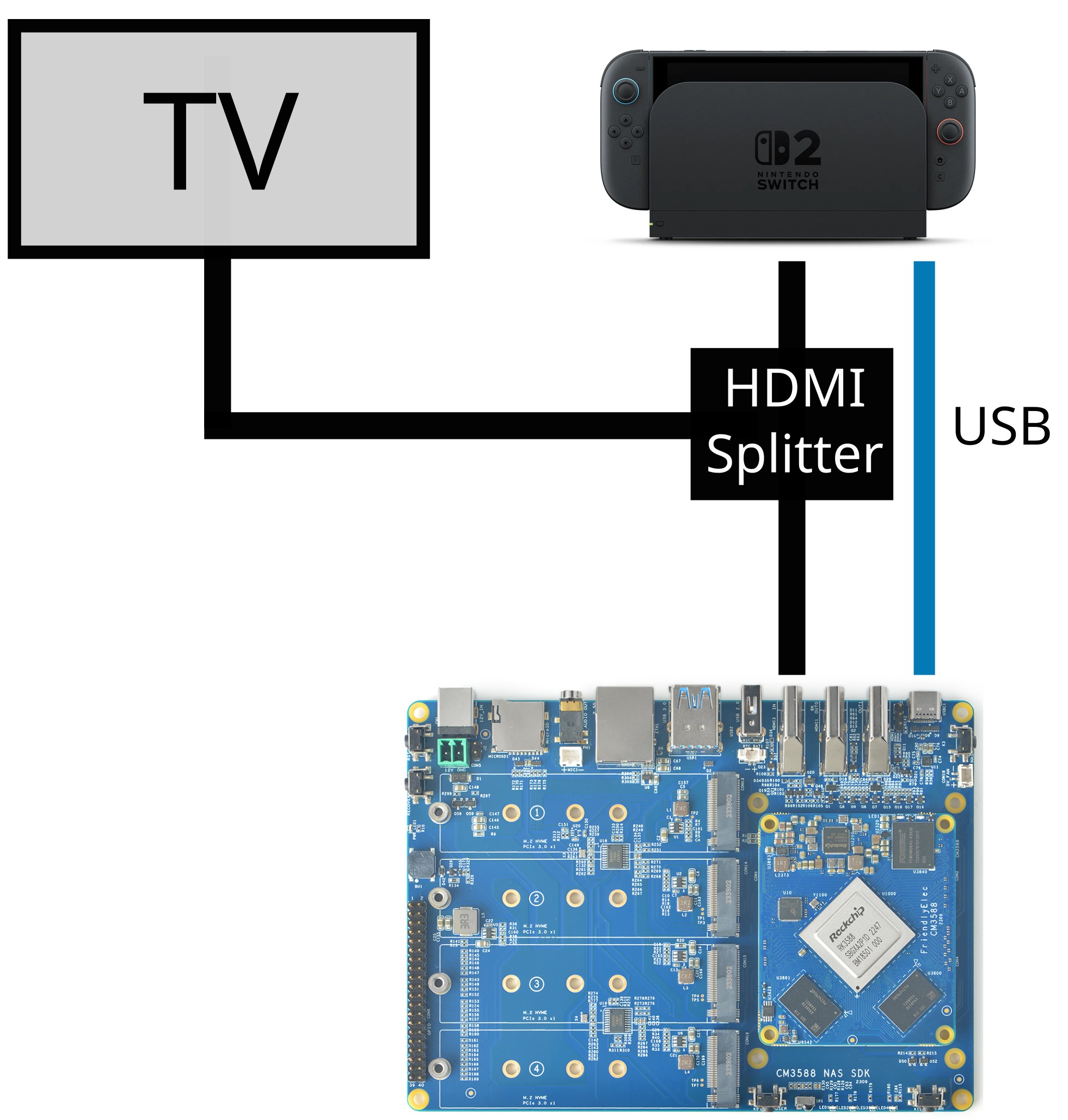
This is how it’ll all be connected:
Testing methodology
To test the latency between either two monitors, or a monitor and the button press on a controller, I used a smartphone capable of recording at 240fps. This is plenty to measure 60fps games, but the time between two frames is still 4.2ms with that. So keep in mind that, when comparing numbers like 58ms and 63ms, it could just be a measurement inaccuracy.
In all of my tests I’ve used the game The Legend of Zelda: Link's Awakening,
because it’s easy to test with and has a constant local input latency with a
Pro 2 controller connected over USB.
Using an HDMI splitter, I verified that there is no latency between my OLED TV in game mode and my Dell P2417H PC monitor, so test results are not affected by using different monitors for displaying locally and via Moonlight.
On the PC running moonlight I’ve used an XBox gamepad connected via USB for all tests, because that’s the lowest latency gamepad I’ve ever seen.
Modern Displays show images just like CRTs: Line by line, top to bottom. You can see what that looks like on my 240fps camera in the following frames, where I switched from the back camera to the front camera in Mario Kart World (click the image, it opens a viewer with multiple frames):
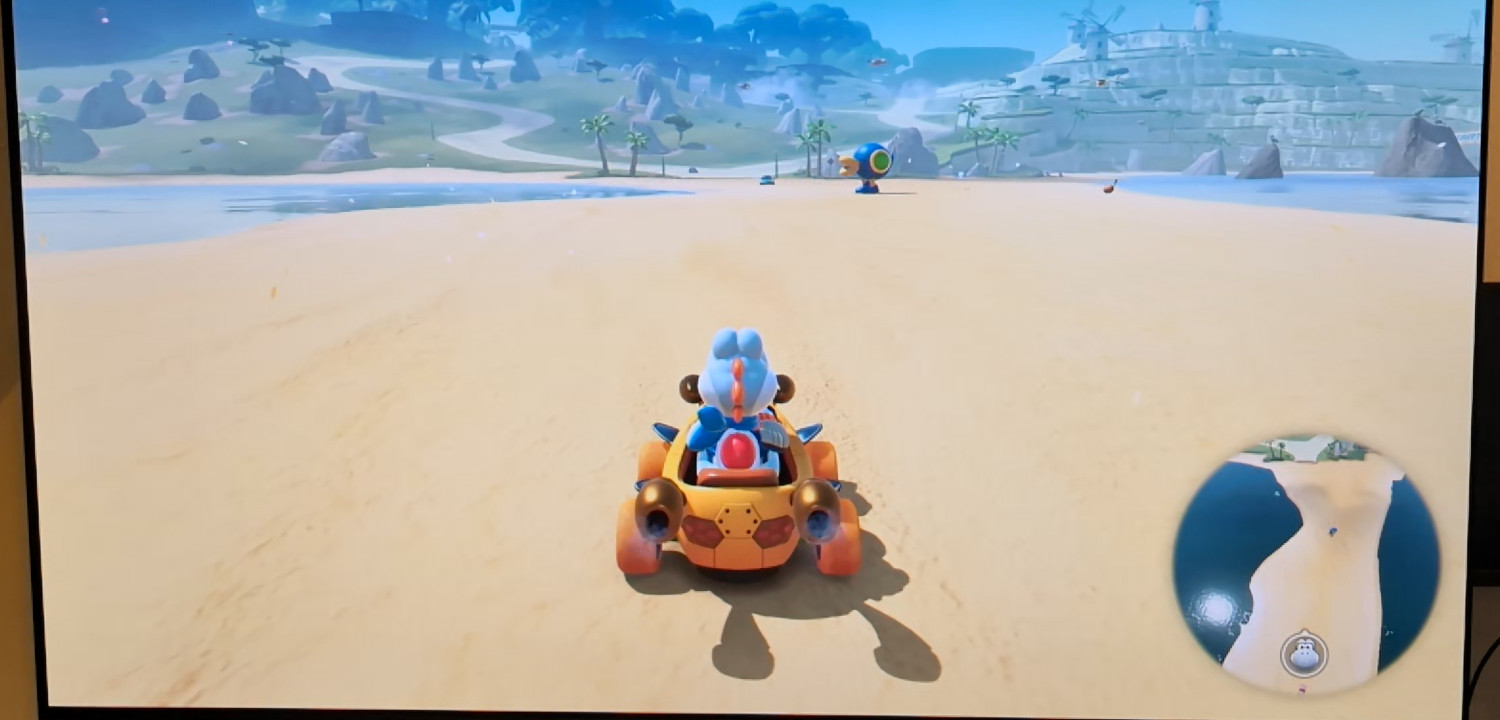
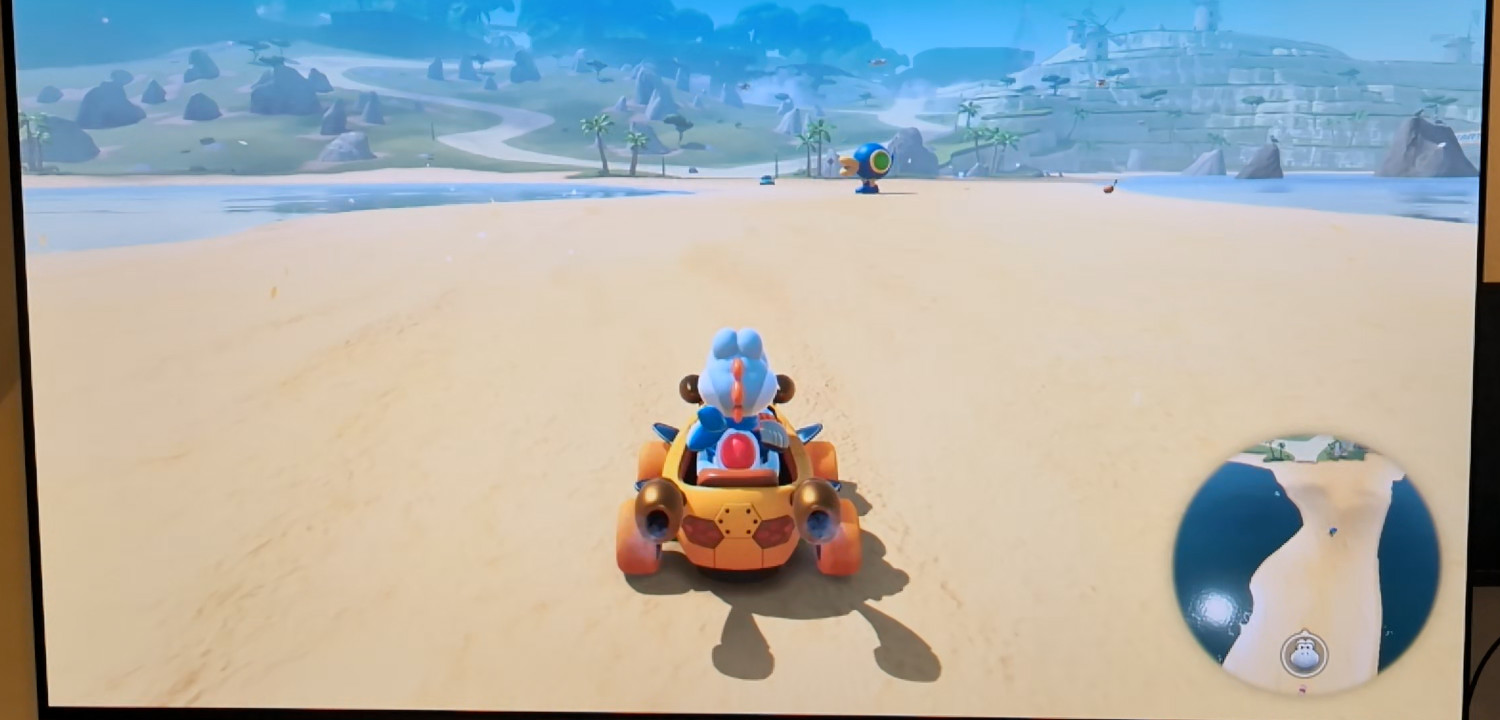
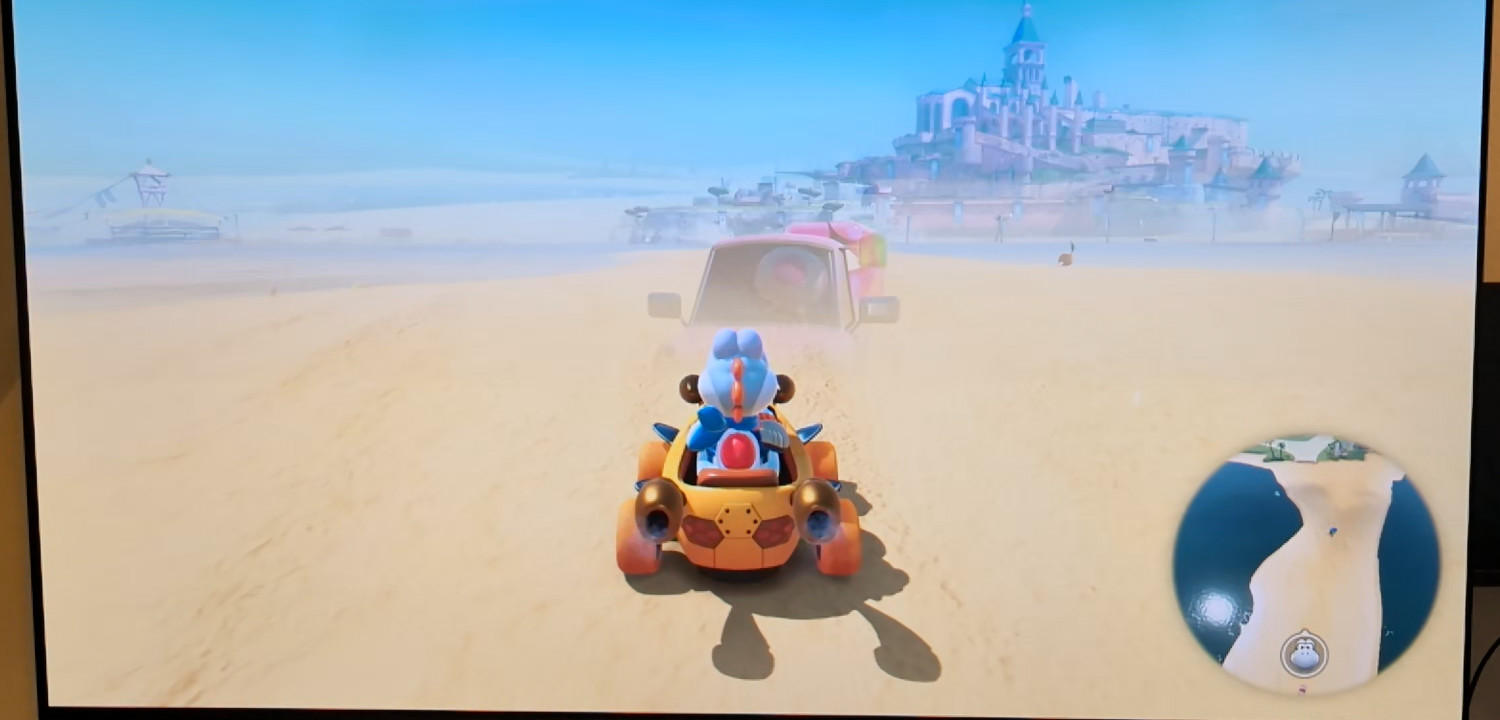
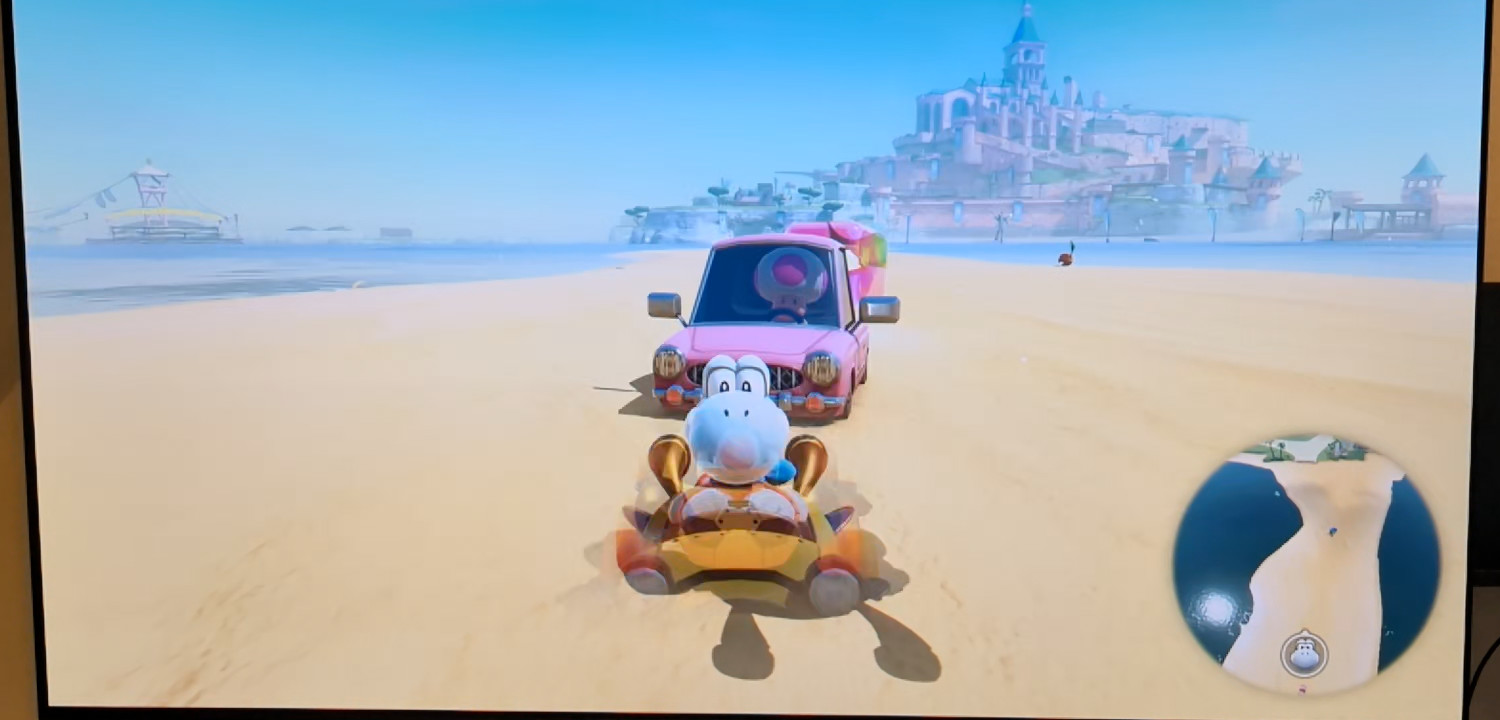
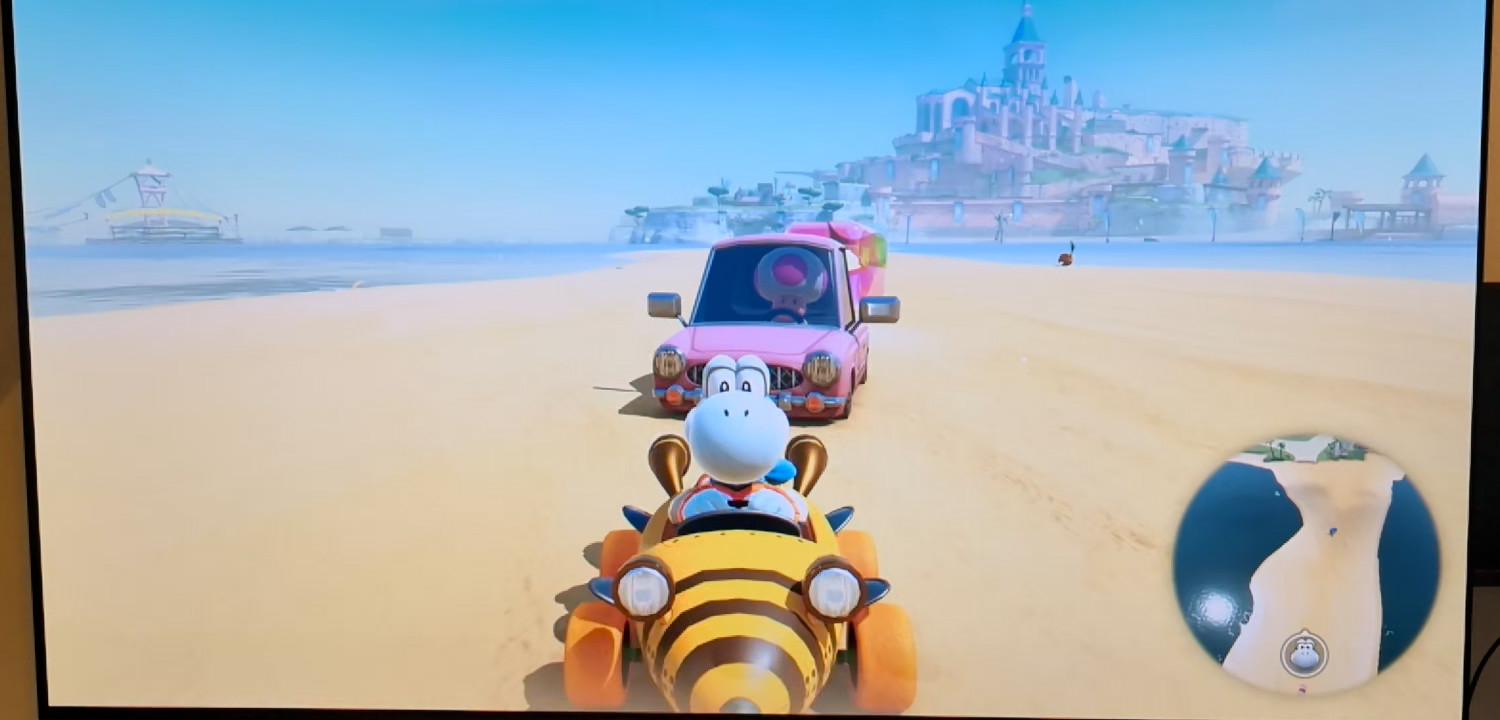
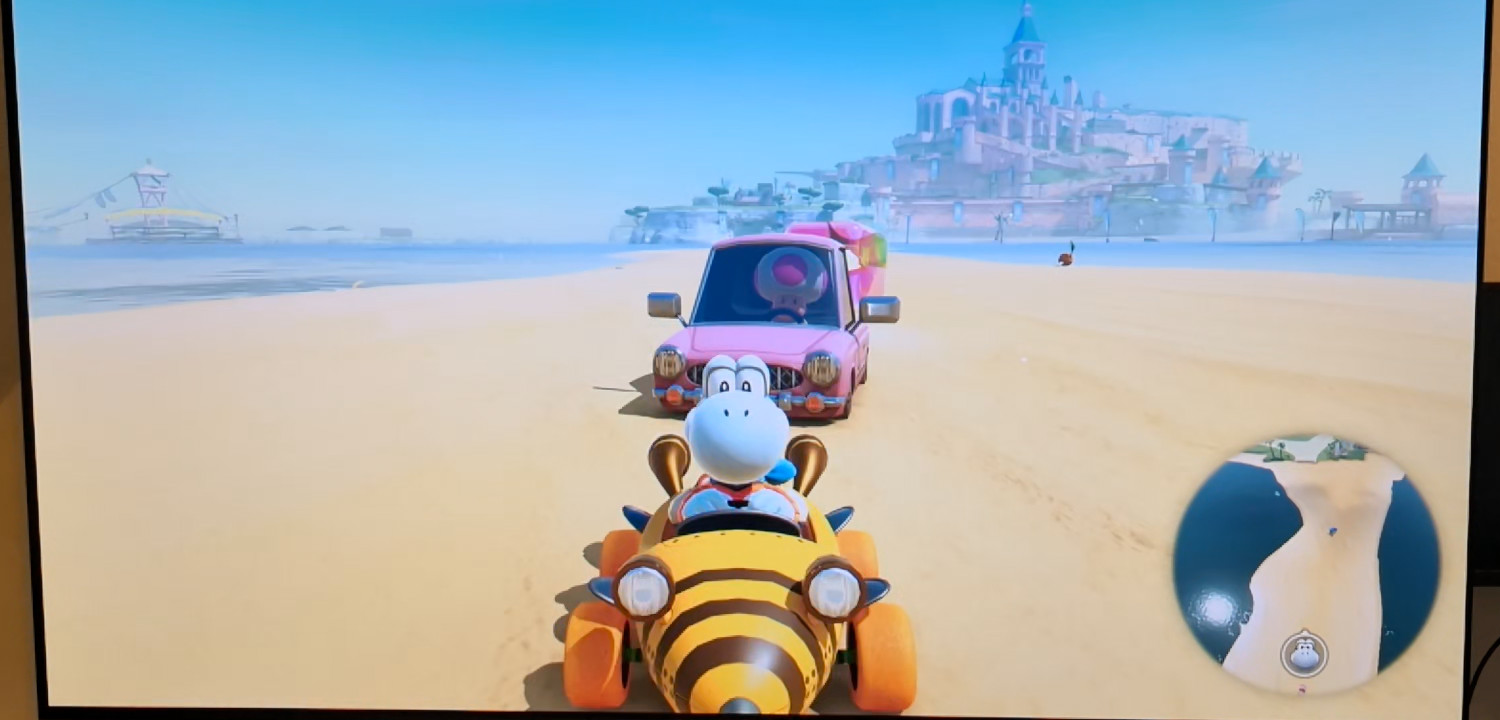
Due to that, there’s an input latency difference between the top and bottom of the screen. At 60Hz, this can be up to 16.67ms. Since Sunshine has to wait for a whole frame before sending it out, all my measurements in this blog post are relative to the bottom of the screen. I do this by moving Link as far to the bottom right of the screen as the game allows and pressing a button which makes him move. If you want to know top-screen latency, just add 16ms to my numbers. This can’t be improved, because most games on Switch are 60Hz only.
First latency tests
I measured the local input latency for Link's Awakening:
- Pro 1 controller via USB: 63ms-84ms
- Pro 1 controller via Bluetooth Classic: 67ms-81ms
- Pro 2 controller via USB: 63-71ms
- Pro 2 controller via Bluetooth Low Energy: 63ms-88ms
So 63ms is the baseline, since it can’t get better than that.
Adding HDMI capture support to Sunshine
The linux kernel exposes the HDMI-RX port as a Video4Linux (V4L) capture
device. It’s a bit special though, since it uses the MPLANE capturing mode,
which you can’t find many code samples for. Luckily, RK3588 doesn’t use many of
the features that come with that mode, so you can simply retrieve one frame
after another just like with the normal mode.
To prevent that the kernel has to copy frame data to a userspace buffer, you
can provide DMA capable buffer file descriptors to the V4L API instead of a
pointer. These can be allocated via ioctls on /dev/dma-buf/cma-uncached.
Receiving V4L Frames in Sunshine
So now, we can call the blocking VIDIOC_DQBUF ioctl in a loop to receive one
frame after another, great. But this creates a complication, since this is very
different from how other display capture implementations in Sunshine work.
Usually, it looks like this:
- Retrieve a DMA buffer handle from the GPU.
- Use OpenGL, to convert the pixel data to NV12 and copy them into a new buffer.
- Pass the new buffer to the video encoder (VA-API).
This is called in a loop, with rate limiting to achieve the FPS selected by the user in Moonlight.
HDMI capture is different, because you can’t just read the current contents of the display whenever you want. You receive a frame, when HDMI wants to send you a frame. And while you can poll the V4L API for new buffers, in my testing, this caused much higher latency during my testing.
After reading Sunshines code for many hours and making a small modification to its capture API, which allows giving back buffers to V4L at the right time, I concluded that I can just make the loop blocking and remove the frame limiting delay. The side effect is, that the Moonlight client will receive frames at the rate the capture card provides them, not the one it requested. Luckily, none of the clients I’ve tested have an issue with that.
Converting frames to NV12
On RK3588, you can use neither OpenGL nor Vulkan in headless mode. While this might be possible on the mainline Linux kernel, we have to stick to Rockchips heavily modified 6.1 fork to get all the features we need. Mainline doesn’t even support capturing HDMI audio, yet.
As a result of that, an alternative way to quickly convert the frames is
needed. After doing some research, I learned that this is possible via the RGA
peripheral. Rockchip even wrote a C++ library for it, which is great … if you
can find it 👀. github.com/rockchip-linux/librga might have existed at some
point, because there are several pages linking to that. Most repos just contain
binary blobs of the library, which I’m not gonna use. After a long search and
by pure coincidence, I found the code on the branch linux-rga-multi of
JeffyCNs mirrors
repository. Thanks
Jeffy, you rock.
This library can directly use the DMA buffer file descritors we allocate from
the dma-buf API and which are filled by V4L, so there’s no additional data
copy necessary.
Encoding to H264/H265
Sunshines codebase makes heavy use of ffmpegs libavcodec. libavcodec has great
support for VA-API, but remember, Rockchips kernel does not support VA-API. The
underlying hardware peripheral responsible for encoding is called MPP and
Rockchip has a library for that … and it’s actually on their
GitHub. MPP based encoders and
decoders are actually supported by mainline ffmpeg if you enable them during
compilation.
I decided to use Nyanmisakas fork of
ffmpeg though because it
implements the hwdevice API, which vastly simplifies passing DMA buffers to
libavcodec 🙏.
Testing the latency
With that, streaming HDMI frames via Sunshine is fully working now 🎉. It was time to test the display latency … 🥁 …: 12.5ms. Moonlight actually has a statistics overlay:
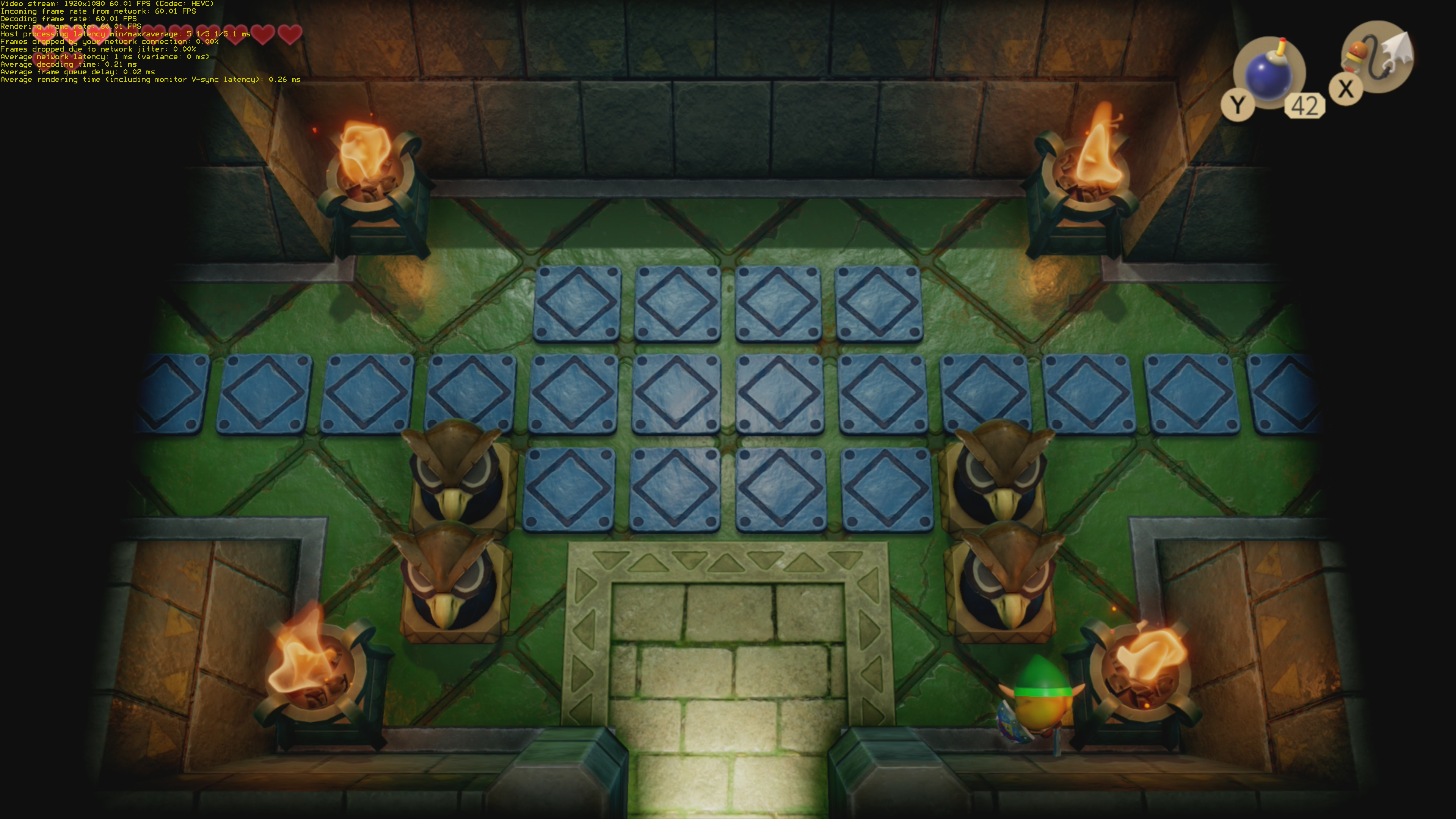
As you can see, the Host Processing Latency of Sunshine itself is just 5.1ms. If you add up the other latencies, they make up an additional ~1.5ms. There being a gap between link and the bottom of the screen should cause another ~2ms difference. All of that adds up to ~8.6ms - a difference of 3.9ms compared to the remote input latency, which is well within the measuring inaccuracy of my 240fps camera.
Adding UDC gamepad support to Sunshine
Now it was time to emulate a gamepad, which is supported by the Nintendo Switch on the RK3588s USB device port and forward inputs from Sunshine to it. How hard can that be? 🙈
Which gamepad to emulate?
I decided to emulate the Pro 1 controller, because it works with both Switch 1 and Switch 2. Additionally, it supports all controller features supported by Sunshine, unlike some of the officially supported third party gamepads.
I’ll not go into detail about how the protocol works, here. dekuNukem documented the basics many years ago. I put together the missing pieces by A/B testing between my implementation and a real Pro 1 controller. I also used a USB Sniffer to debug issues, like me setting the wrong bits 😅.
The Sunshine APIs
For every client, Sunshine allocates an input context. Each client can add and remove virtual gamepads at any time. Moonlight does request one virtual gamepad for every physical gamepad which is connected to the device running Moonlight. Usually, there is a thread for every gamepad, which receives rumble commands from the OS and sends them to moonlight. I added the thread and the callback but did not implement rumble, yet.
On Linux, Sunshine uses the C++ library inputtino to create virtual gamepads. I considered adding UDC support in there, but unfortunately, it seems their code is very tied to their backends and I couldn’t come up with a good way to implement it there. So instead, I created a new library called udcinput, which is designed to emulate any controller via USB HID, but currently supports the Pro 1 controller only.
Implementing udcinput
Implementing udcinput was not easy and I went through many rewrites.
Multiple HID gamepads on one UDC
The USB specification allows offering multiple HID function on a single USB device. I did not expect this to actually work with the Nintendo Switch, but it does. It allows me to emulate multiple Switch 1 Pro controllers via a single USB cable 🎉.
This is still limited by the RK3588s UDC controller, because each HID function needs to allocate from a limited number of USB endpoints, but there should be enough for 4 gamepads.
Adding or removing an HID function requires disabling and re-enabling the UDC, which causes all gamepads to disconnect. I’d call this a feature, because it makes the Switch pop up the controller/player assignment dialog which is probably what you want to do in that situation anyway.
After I’ve implemented this, I was greeted by this message in the Linux kernel log:
[  276.440740] list_del corruption. prev->next should be
ffff00000c72e7f0, but was ffff0000023c84a0. (prev=ffff0000023c84a0)
[  276.451905] ------------[ cut here ]------------
[  276.456345] kernel BUG at lib/list_debug.c:62!
[  276.460836] Internal error: Oops - BUG: 00000000f2000800 [#1]  SMP
[  276.592961] CPU: 0 UID: 0 PID: 1756 Comm: bash Tainted: G         C
         6.17.1-300.fc43.aarch64 #1 PREEMPT(voluntary)
[  276.604226] Tainted: [C]=CRAP
[  276.607215] Hardware name: raspberrypi Raspberry Pi 4 Model B Rev
1.1/Raspberry Pi 4 Model B Rev 1.1, BIOS 2025.10 10/01/2025
[  276.618677] pstate: 60400005 (nZCv daif +PAN -UAO -TCO -DIT -SSBS BTYPE=--)
[  276.625725] pc : __list_del_entry_valid_or_report+0xb8/0x110
[  276.631451] lr : __list_del_entry_valid_or_report+0xb8/0x110
[  276.637179] sp : ffff80008082bb80
[  276.640527] x29: ffff80008082bb80 x28: ffff00000509a540 x27: 0000000000000000
[  276.647756] x26: 0000000000000000 x25: 0000000000000000 x24: 0000000000000000
[  276.654982] x23: 0000000000000001 x22: ffffbc93e4208d00 x21: ffff00000c72e7f0
[  276.662209] x20: ffffbc93e69cbf90 x19: ffff00000c72e5b8 x18: 00000000ffffffff
[  276.669435] x17: 20747562202c3066 x16: 3765323763303030 x15: 0720072007200720
[  276.676661] x14: 0720072007200720 x13: 0720072007200720 x12: 0720072007200720
[  276.683888] x11: 0000000000000001 x10: 0000000000000001 x9 : ffffbc93e2ef94c8
[  276.691114] x8 : ffffbc93e63b8168 x7 : ffff80008082b8f0 x6 : 0000000000000001
[  276.698341] x5 : 0000000000000000 x4 : 0000000000000001 x3 : 0000000000000000
[  276.705568] x2 : 0000000000000000 x1 : ffff00000509a540 x0 : 000000000000006d
[  276.712794] Call trace:
[  276.715262]  __list_del_entry_valid_or_report+0xb8/0x110 (P)
[  276.720990]  cd_forget+0x3c/0x90
[  276.724250]  evict+0x220/0x250
[  276.727333]  iput_final+0xb8/0x160
[  276.730771]  iput.part.0+0x104/0x130
[  276.734384]  iput+0x24/0x40
[  276.737203]  dentry_unlink_inode+0xc8/0x1a0
[  276.741435]  __dentry_kill+0x84/0x200
[  276.745135]  dput+0x80/0xe8
[  276.747956]  __fput+0x12c/0x300
[  276.751128]  fput_close_sync+0x40/0x120
[  276.755006]  __arm64_sys_close+0x40/0x98
[  276.758972]  invoke_syscall.constprop.0+0x64/0xe8
[  276.763731]  el0_svc_common.constprop.0+0x40/0xe8
[  276.768490]  do_el0_svc+0x24/0x38
[  276.771839]  el0_svc+0x3c/0x168
[  276.775010]  el0t_64_sync_handler+0xa0/0xf0
[  276.779242]  el0t_64_sync+0x1b0/0x1b8
[  276.782947] Code: a94107e3 9129a000 f9400062 97d7bf71 (d4210000)
[  276.789118] ---[ end trace 0000000000000000 ]---
Yes, I managed to trigger a Linux kernel bug 👀. Surely, this was just an issue in Rockchips low-quality 6.1 fork? Nope. Maybe it just happens on RK3588? Nope, happens on Raspberry Pi4 as well 🤔.
After multiple days of debugging and some discussions on the usb-linux mailing list, I managed to fix the bug. Apparently, nobody has ever tried to restart an HID function, while userspace is still using it 🙈.
With that rabbit hole out of the way, I continued my work and finally:
[ 1585.712192] kernel BUG at lib/list_debug.c:59!
[ 1585.714670] Internal error: Oops - BUG: 00000000f2000800 [#1] SMP
[ 1585.714681] Modules linked in: r8169 pwm_fan at24 rk_crypto cryptodev rknpu uio_pdrv_genirq uio cfg80211 sch_fq_codel nfnetlink
[ 1585.726752] CPU: 6 PID: 549 Comm: sunshine Tainted: G        W          6.1.162 #4
[ 1585.729936] Hardware name: FriendlyElec CM3588 (DT)
[ 1585.732854] pstate: 604000c9 (nZCv daIF +PAN -UAO -TCO -DIT -SSBS BTYPE=--)
[ 1585.735632] pc : __list_del_entry_valid+0x90/0xd4
[ 1585.737741] lr : __list_del_entry_valid+0x90/0xd4
[ 1585.739837] sp : ffffffc009133c60
[ 1585.741787] x29: ffffffc009133c60 x28: ffffff810bd28640 x27: ffffff810bd28641
[ 1585.744089] x26: 0000000000000000 x25: 0000000000000002 x24: 0000000000000000
[ 1585.746399] x23: ffffff810bd28640 x22: ffffff810a2f1c00 x21: 0000000000000000
[ 1585.748712] x20: ffffff810b05f178 x19: ffffff8107f1a790 x18: 0000000000000006
[ 1585.751014] x17: 20747562202c3861 x16: 3761316637303138 x15: 6666666666662065
[ 1585.753317] x14: 6220646c756f6873 x13: 2930393166353062 x12: 3031386666666666
[ 1585.755629] x11: ffffffdbf0aaa3c0 x10: 0000000000000000 x9 : ffffffdbeed9c9d4
[ 1585.757955] x8 : 000000000002ffe8 x7 : 00000000ffffe000 x6 : 0000000000000000
[ 1585.760279] x5 : ffffff84fde3c990 x4 : ffffff84fde3c990 x3 : 0000000000000000
[ 1585.762595] x2 : 0000000000000000 x1 : ffffff8100b64ec0 x0 : 000000000000006d
[ 1585.764914] Call trace:
[ 1585.766815]  __list_del_entry_valid+0x90/0xd4
[ 1585.768894]  remove_wait_queue+0x30/0x6c
[ 1585.770932]  __ep_remove+0x5c/0x220
[ 1585.772920]  ep_remove_safe+0x20/0x44
[ 1585.774929]  do_epoll_ctl+0x52c/0xd40
[ 1585.776926]  __arm64_sys_epoll_ctl+0x130/0x170
[ 1585.778984]  invoke_syscall+0x4c/0x108
[ 1585.780959]  el0_svc_common.constprop.0+0xc8/0xe8
[ 1585.783013]  do_el0_svc+0x20/0x30
[ 1585.784928]  el0_svc+0x14/0x48
[ 1585.786799]  el0t_64_sync_handler+0x10c/0x120
[ 1585.788786]  el0t_64_sync+0x14c/0x150
Uhm, another kernel bug? Yep, also works on Raspberry Pi4 with the mainline linux kernel, just like the previous one. Apparently I’m also the first one who uses epoll with the HID function while restarting the UDC gadget to add another gamepad 🙄.
So I spend some more days debugging and fixing this 🤐. This the last HID kernel bug I found, I promise 😛.
Timer field
The Pro 1 protocol is a bit special. The HID reports which contain the button states, also contain an incrementing timer. This timer field is also present in responses to requests, which the gamepad has to be able to answer at any time. udcinput processes these requests in the per-gamepad thread which means it has to synchronize sending out reports between two threads, to keep the timer field consistent - without introducing additional latency. I eventually found a way though.
Latency Measurements
I measured the time between pressing a button on the gamepad which is attached to the PC running Moonlight, and you seeing the game react on the local display (not the Moonlight display). It’s 63ms-71ms, which is exactly the same as the local input latency with a Pro 2 controller via USB. That means, it’s just as quick as a real gamepad 😏.
With that, the final remote input latency seems to be about 76ms-80ms.
Reducing Latency under high traffic
Writing an HID report with button events onto the USB bus is different from what all the other gamepad implementations in Sunshine do. That’s because you have to wait for the USB host (Nintendo Switch) to poll the gamepad and receive the data. Thus, the process takes a lot longer than simply creating a new event in the input queue of the local operating system. USB devices can say which polling rate they support, but the Switch limits this to max 60Hz. Yes, that’s right, it’s not 1000Hz as many PC gamers would expect.
In the USB capture below you can see that it actually seems to toggle randomly between 62.5Hz and 125Hz:
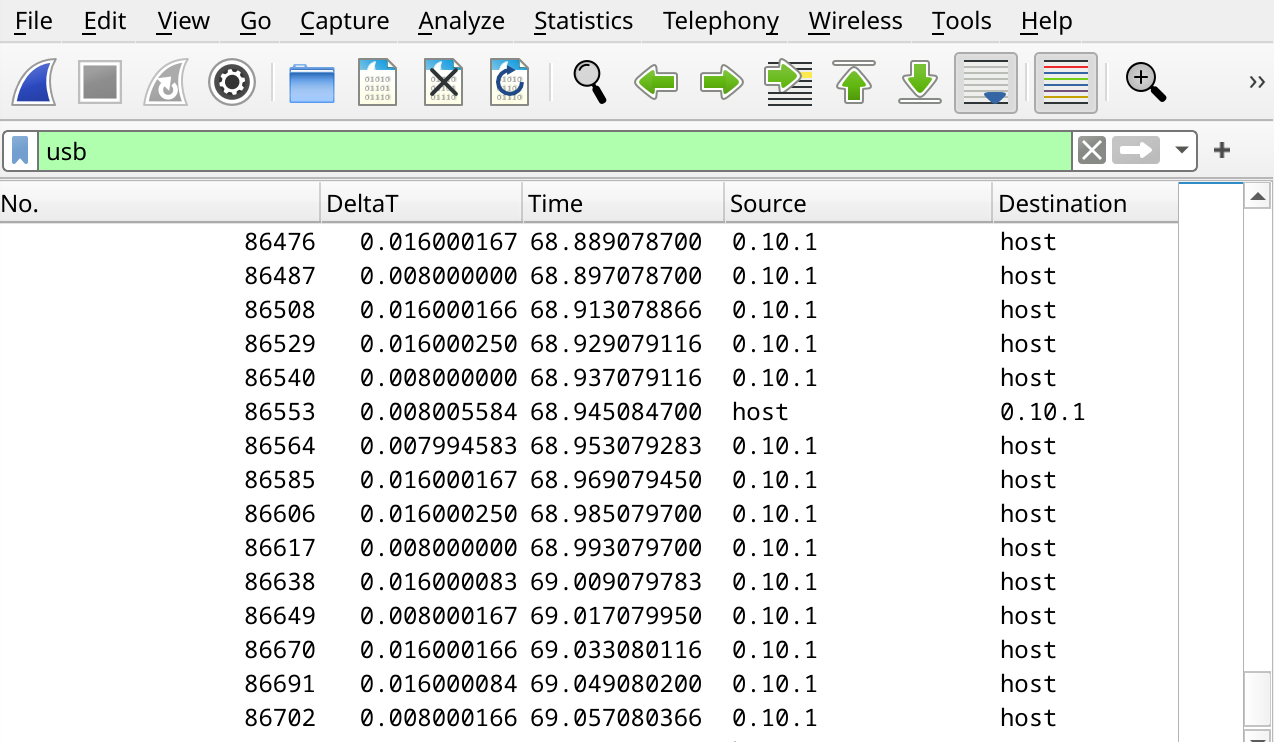
Anyways, this means that it can take up to 16.68ms to send out a report. That by itself is not an issue, because Sunshine has a separate input thread, but it can have side effects. For example, if you send two rapid button presses in sequence, you might have to wait 16ms to send out the first report and another 16ms to send out the second report. This means, that the second button had to wait 32ms to arrive at the console.
That problem is not solvable for button presses, but is also less of an issue for those, because most people can’t press buttons that quickly. And even if they do, they might be fine with the slight delay. Button presses must never be dropped or combined, since that can cause unexpected behavior in game.
Analog sticks are different. They cause a lot of events, and for most games it’s fine to only send the last known value instead of all the values in between. The Sunshine developers know this, which is why they combine all successive events in the queue where the button states haven’t changed. Changes in analog sticks or triggers are allowed to be combined.
udcinput makes the same assumption to prevent blocking the input thread, just to send out an event which doesn’t even change any button states. Without this special case, udcinput would prevent Sunshine from forwarding an event with actual button changes. Due to how this accumulates, I measured a button input latency of 109ms if it was pressed while moving the analog stick. After the fix, it was down to 63ms, which is the same as without any stick movement.
Buildroot
In the beginning, I simply installed FriendlyElecs Ubuntu port for CM3588 and compiled software on the device itself. Halfway through the work I ported Buildroot, so the compilation is faster and I can easily build the whole system with all changes necessary instead of creating a manually set-up, unique system over several months.
This was actually surprisingly easy, because some other RK3588 boards were supported already. Notable features which I implemented:
- Use Rockchip 6.1 kernel instead of mainline, since I need that for HDMI capture.
- Use mainline U-Boot together with the 6.1 kernel, to simplify the boot process.
- Make the exact same image work on both eMMC and microSD card.
- Readonly squashfs rootfs, with overlay tmpfs and a data partition for certain data.
Bootloader bug
When I tried to boot from the readonly squashfs for the first time it didn’t boot anymore, without any error message. It simply didn’t find anything to boot.
Turns out, I’m the only one trying to boot from an uncompressed squashfs using extlinux 😁. While this took some time to debug, the fix is pretty easy.
Performance optimizations
- I set the CPU affinity of Sunshine, so it only runs on the performance cores.
- I set the CPU governor to
performance, to keep all cores at maximum frequency at all times.
This removed random changes in host processing latency, giving me a constant 5.1ms.
Additionally, I compiled everything using optimization level 3. I didn’t notice any difference, but it also doesn’t seem to cause any issues with Sunshine.
Closing words
As I mentioned before, the remote input latency of the whole system is
76+ ms for the game The Legend of Zelda: Link's Awakening, measured relative
to the bottom of the screen. If you would measure at the top of the screen, it
would be 93ms.
Admittedly, this is not as low as I’d like it to be, but it’s pretty good, given that the best possible latency is 63ms. This means, that the whole system adds at least 13ms of latency.
So there you have it, after doing over 200 latency tests and fixing 3 bugs in other projects, I can finally play tennis 🎾.
The code is available on GitHub.
Let’s have some fun
Being able to play Switch 2 games via Moonlight means that I can play them on any device which has a Moonlight client, including a Switch 1 😁